


INTRODUCTION:
The iPhone could be one of the greatest inventions to further productivity and communication, ever. Of course I may be skewed because I drank the Kool-Aid for 8 years but nonetheless. Using the iPhone throughout the day I realize from time to time there are many people that don’t understand the full potential that rests in their pocket. The power of Google and the internet aside. Here are the top ten features I’ve noticed people either don’t know about or forget to use.
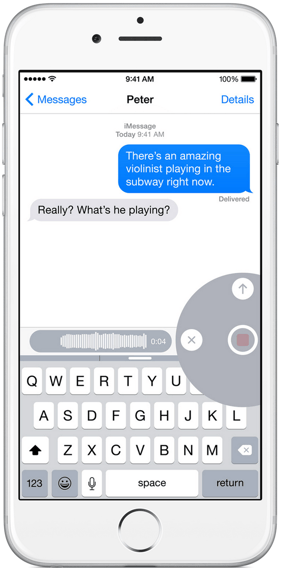
1. Voice Messages
No not voicemails, voice messages. Within the messages app (for texting) you can create little sound bytes to send. This can save time punching keys or add some personalization to your quip or tell your business partner you just closed the deal!
2. Calculator In The Lock Screen
Yes, the often overlooked Calculator App can be accessed by swiping up on your iPhone to bring up the control panel. Select the icon most resembling a calculator. Turn the iPhone sideways (landscape) and you get a full list of options for math geeks everywhere. Sin or Cos anyone?
*Hint* You can also copy and paste numbers by tapping in the display field.
3. Daily Motivation
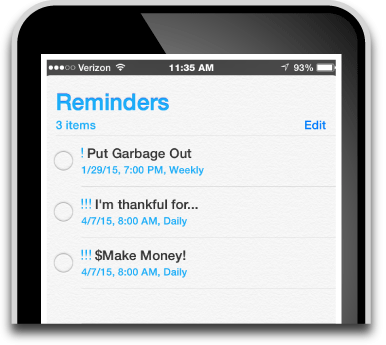
There are so many things to remember in the day but I always want to be reminded of what I’m thankful for, and my goals. The Reminders app allows you to create daily reminders at specific times. Like, you should put the garbage out on the curb, or you should check your furnace filter, or you should start Inbound Marketing!
*Hint* Use location specific reminders, like when you arrive at work, remind yourself to smile. It can make your days much better.
4. Alarm
Often overlooked that this feature can also be accessed from the lock screen by swiping up. You can set an alarm and wake up to any song in your library or pick a ringtone. *Hint* When setting your alarm at night also tap the moon icon or ‘Do No Disturb’ button which shuts off all sounds, beeps, buzzes, etc. Don’t worry, your alarm still comes on and you can get some sleep!
Note that all of these features are part of Apple's current iOS 8. iOS 9 is has been released. If you finally have your business mobile optimized, iOS 9 is set to change the way hundreds of millions of users search the web and interact with content.
Start planning for iOS 9 and Optimizing your Mobile Marketing Strategy.
5. Medical ID
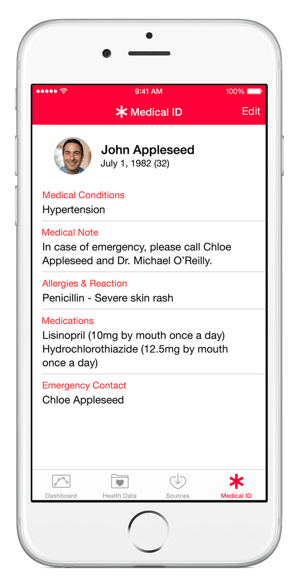
This can be a life saver, literally! Setup your options in the Health App. The Medical ID is accessed by swiping to the right and clicking on the Emergency button. From that screen at the bottom is another button labeled ‘*Medical ID’. This can bridge the gap between life and death. What your blood type is, weight, height, and if you’re an organ donor. Oh, and they can contact your emergency contact from this screen as well.
6. A Level
This is maybe less used but a very cool feature nonetheless. Several times I’ve even forgotten about this when doing any type of maintenance or building project. Located within the Compass App (yes there’s a pretty awesome compass as well) swipe left to reveal the level. The Level works for any type of surface, a countertop, a wall, or defining an angle. Very cool.

7. Track Your Steps
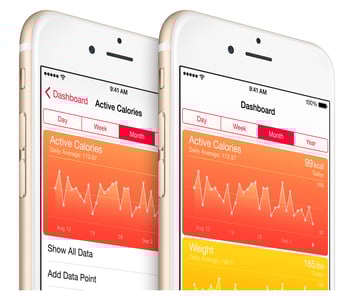
Yes, most people forget that built into every iPhone (4s or later) is a pedometer. Accessed thru the Health App you can see metrics that matter like Steps, Distance, Flights Climbed, etc over the course of a day, week, month, or year. Connect devices that monitor health to this app for a unified look at your health.
8. Keyboard Shortcuts
Forget predictive text and fancy 3rd party keyboards for your phone, use shortcuts. If you work from your mobile device or send a lot of emails or long messages from your phone you should look at creating shortcuts. Go to Settings > General > Keyboard > Shortcuts and tap the + button to create your shortcuts. As an example I often send out my email address so instead of typing out the whole thing I simply type ‘zz’ and it autofills the rest.
*Hint* These shortcuts also sync with your Mac so you can use them when you type on either device. Super Cool!
9. Make Text Easier To Read
A lot of people have issues with vision and get the largest phone they can so they can read the text. Not needed with the iPhone. The iPhone allows you to customize the font size and contrast to make it easier to read for you. Go to Settings > General > Accessibility and the first section is all dedicated to customizing the vision of the iPhone experience. I’m a fairly young guy and I turned on ‘Bold Text’ because it makes everything pop much better.
10. Touch ID
I still run into people that forget they don’t have to type in their passcode to unlock their phone. They can simply press a finger on the home button to unlock. Boom! It such a simple thing that many forget how useful it is everyday.
*Hint* Use Touch ID within apps and the iTunes Store to unlock or make purchases instead of typing in passwords.
CONCLUSION:
There is of course always an ‘app for that’. But there are many functions and features built right into the iPhone that can make your day a whole lot better. This article should have been helpful in at least one way, you betchya.
If you have a mobile device you are probably reading this on your smart phone. You now have a greater understanding of why mobile devices are so important to reaching customers, audiences, colleagues, etc.
// Zack
At Kpahi, we believe the internet is powerful. Let's use it.
See how your business looks across the internet on mobile devices. Are you capturing these users?